Money & Calculations
How to Calculate Percentage Increase and Decrease: Formula and Examples
Percentage change = (new − old) ÷ old × 100. Going from 40 to 50 is +25%. Worked examples, a quick table and the mistakes that give wrong answers.

Written by Ahad NoorPublished 7 min read
To calculate a percentage increase, subtract the old value from the new value, divide by the old value, and multiply by 100. Going from 40 to 50 is (50 − 40) ÷ 40 × 100 = 25%. A negative answer means a percentage decrease instead.
This guide gives the formula, a table of worked examples, the quick way to add or take off a percentage, and the mistakes that most often produce wrong answers, such as treating a 50% rise and a 50% fall as if they cancel out. Every figure was checked with the percentage change calculator.
Contents
What is the formula for percentage increase?#
A percentage change compares the size of a change with the size you started from. The starting value is the reference, so it always goes on the bottom of the fraction.
Percentage change
Percentage change = (new value − old value) ÷ old value × 100
Positive result = increase. Negative result = decrease.
The old value must not be zero: a percentage change from zero is undefined.
Worked example: a price rises from 80 to 100
Assumptions: Any currency; the old price is 80 and the new price is 100.
- Difference: 100 − 80 = 20.
- Divide by the old value: 20 ÷ 80 = 0.25.
- Multiply by 100: 0.25 × 100 = 25% increase.
The price went up by 25% of its original value.
The same steps work for any quantity: prices, salaries, website visits, test scores, savings balances or weights. Only the meaning of the old and new value changes.
Percentage increase and decrease examples#
The table applies the formula to eight pairs of numbers. The last column is the plain difference, which is the top of the fraction.
| Old value | New value | Difference | Percentage change | Direction |
|---|---|---|---|---|
| 40 | 50 | 10.00 | 25.0% | Increase |
| 80 | 100 | 20.00 | 25.0% | Increase |
| 100 | 150 | 50.00 | 50.0% | Increase |
| 150 | 100 | −50.00 | −33.3% | Decrease |
| 200 | 170 | −30.00 | −15.0% | Decrease |
| 60 | 75 | 15.00 | 25.0% | Increase |
| 1,250 | 1,500 | 250.00 | 20.0% | Increase |
| 19.99 | 24.99 | 5.00 | 25.0% | Increase |
Percentages are rounded to one decimal place.
Rows 1, 2, 6 and 8 all show 25% even though the numbers are very different. Percentage change measures the proportion, not the size of the gap, which is why it is useful for comparing changes between things of different scale.
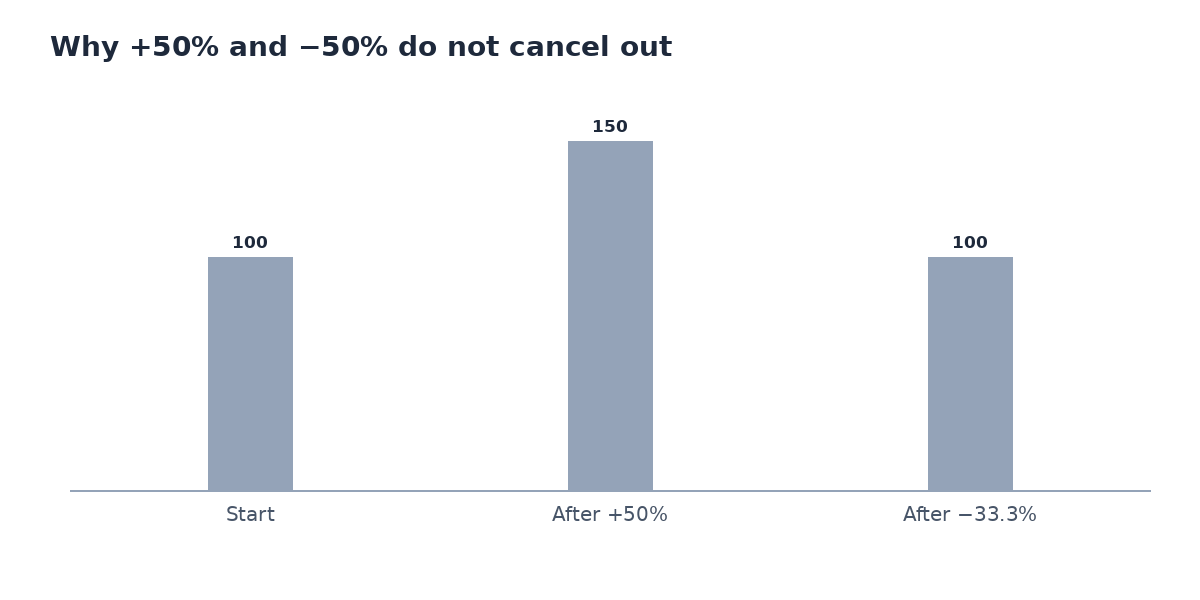
Rows 3 and 4 are the same pair of numbers in opposite directions. Going from 100 to 150 is up 50%, but going back from 150 to 100 is down only 33.3%. The next section explains why.
Why +50% and −50% do not cancel out#
Each percentage is measured against a different starting value. After a 50% rise from 100 you are at 150. A 50% fall is then taken from 150, not from 100, so it removes 75 and leaves 75.
Worked example: a 20% rise then a 20% fall
Assumptions: Start at 200; both changes are applied one after the other.
- After +20%: 200 × 1.20 = 240.
- After −20%: 240 × 0.80 = 192.
- Net change: (192 − 200) ÷ 200 × 100 = −4%.
You end up 4% below where you started, because the fall is taken from a larger number.
This matters for investments and prices. A fund that loses 50% needs to gain 100% to recover, and a shop that raises a price by 25% and then offers 25% off sells it for less than the original price.
How to add or take off a percentage#
You do not need to work out the percentage change first. Multiply by a single factor instead:
- Add a percentage: multiply by 1 plus the rate as a decimal. Adding 15% means × 1.15.
- Take off a percentage: multiply by 1 minus the rate. Taking off 20% means × 0.80.
- Undo a percentage: divide by the same factor. A price of 92 after adding 15% was 92 ÷ 1.15 = 80.
| Start | Change | Multiply by | Result |
|---|---|---|---|
| 80 | Add 15% | 1.15 | 92.00 |
| 150 | Take off 20% | 0.80 | 120.00 |
| 250 | Add 12% | 1.12 | 280.00 |
| 60 | Take off 35% | 0.65 | 39.00 |
To find the original value before a change, use the reverse percentage calculator. For repeated discounts in a shop, the sale price calculator applies them in order.
Percentage points and percentage difference#
Two similar-sounding ideas cause most of the confusion:
- Percentage points are the plain subtraction of two percentages. A rate rising from 4% to 5% is up 1 percentage point.
- Percentage change compares them relatively. The same move is (5 − 4) ÷ 4 × 100 = a 25% increase in the rate.
- Percentage difference compares two numbers with neither one being the “old” value. It divides the gap by their average: for 40 and 50 that is 10 ÷ 45 × 100 = 22.2%, not 25%.
Before you quote a percentage
- Say what the starting value was.
- Say whether you mean percentage points or percent.
- Give the two numbers as well as the percentage when the base is small.
- Round at the end, not in the middle of the calculation.
Common mistakes#
Mistake: Dividing by the new value instead of the old one.
Instead: From 80 to 100 the change is 20 ÷ 80 = 25%, not 20 ÷ 100 = 20%. The old value is always the base.
Mistake: Adding a percentage rise and a percentage fall to get the net change.
Instead: Multiply the factors instead: 1.20 × 0.80 = 0.96, which is a 4% fall, not 0%.
Mistake: Calling a change from 4% to 5% “a 1% rise”.
Instead: It is a 1 percentage point rise, or a 25% relative rise. The two are very different statements.
Mistake: Rounding the percentage before using it in the next step.
Instead: Keep full precision until the final answer, then round once.
Try the tool
Percentage Change Calculator
Find the percentage increase or decrease between two numbers, or add and take off a percentage, with every step shown.
Open the Percentage Change CalculatorFrequently asked questions#
How do I calculate percentage increase from 40 to 50?
Subtract 40 from 50 to get 10, divide 10 by 40 to get 0.25, and multiply by 100. The increase is 25%. The percentage calculator shows each of these steps.
How do I calculate a percentage decrease?
Use the same formula. If the new value is lower the answer is negative: from 150 to 100 is (100 − 150) ÷ 150 × 100 = −33.3%, which you report as a 33.3% decrease.
How do I add 15% to a number?
Multiply it by 1.15. For example 80 × 1.15 = 92. To add 15% and then take it off again you cannot just multiply by 0.85; divide by 1.15 instead.
How do I work out a percentage change in Excel or Google Sheets?
With the old value in A2 and the new value in B2, use =(B2-A2)/A2 and format the cell as a percentage. Do not multiply by 100 yourself when the cell is formatted as a percentage.
Can a percentage increase be more than 100%?
Yes. If a value more than doubles the increase is over 100%: from 20 to 70 is (70 − 20) ÷ 20 × 100 = 250%. A percentage decrease cannot exceed 100%, because the value cannot fall below zero.
What is the difference between percentage change and percentage difference?
Percentage change uses the old value as the base and has a direction. Percentage difference uses the average of the two values as the base and has no direction. For 40 and 50 they are 25% and 22.2%.
Ahad Noor
Ahad Noor builds and maintains Momentix, including its calculators, converters and the guides on this blog.
Each guide is checked against the matching Momentix tool, so the worked examples show the same figures the tool gives for the same inputs.