Dates & Time
How to Calculate the Days Between Two Dates (With Examples)
Subtract the earlier date from the later one: 15 January to 3 October 2026 is 261 days. Worked examples, leap years, month-end rules and weeks.

Written by Ahad NoorPublished 8 min read
To find the number of days between two dates, subtract the earlier date from the later one. From 15 January 2026 to 3 October 2026 there are 261 days, which is 37 weeks and 2 days, or 8 months and 18 days. The only real decisions are whether to count the start day as well, how to treat leap years, and how to express the gap in months.
This guide shows how to count by hand, gives a table of six worked pairs, explains the month-end rule and leap-year effect, and points to the right tool when you need working days or an exact age. Every figure was produced with the same functions as the date difference calculator.
Contents
How do you count the days between two dates?#
Count the days left in the first month, add the full months in between, then add the days in the last month up to the end date. It is the same idea a calendar gives you, only with arithmetic.
Worked example: 15 January to 3 October 2026, by hand
Assumptions: 2026 is not a leap year, so February has 28 days. The start day is not counted.
- Rest of January after the 15th: 31 − 15 = 16 days.
- Full months February to September: 28 + 31 + 30 + 31 + 30 + 31 + 31 + 30 = 242 days.
- Days in October up to the 3rd: 3 days.
- Total: 16 + 242 + 3 = 261 days.
261 ÷ 7 = 37 weeks with 2 days left over.
Days between two dates
Days = end date − start date
Weeks = whole number of days ÷ 7, with the remainder as extra days
Spreadsheets store each date as a number, so in a cell the formula is simply =B2-A2 with the dates in A2 and B2.
Six worked examples#
The table shows the gap between six pairs of dates in total days, weeks and days, and the calendar breakdown of years, months and days. The last two columns can differ in surprising ways, which the next sections explain.
| From → to | Total days | Weeks and days | Years, months, days | Whole months |
|---|---|---|---|---|
| 15 Jan 2026 → 3 Oct 2026 | 261 | 37 weeks 2 days | 0y 8m 18d | 8 |
| 14 Oct 2026 → 1 Jan 2027 | 79 | 11 weeks 2 days | 0y 2m 18d | 2 |
| 28 Feb 2024 → 1 Mar 2024 (leap year) | 2 | 0 weeks 2 days | 0y 0m 2d | 0 |
| 28 Feb 2025 → 1 Mar 2025 | 1 | 0 weeks 1 days | 0y 0m 1d | 0 |
| 1 Jan 2000 → 14 Oct 2026 | 9783 | 1397 weeks 4 days | 26y 9m 13d | 321 |
| 31 Jan 2026 → 28 Feb 2026 | 28 | 4 weeks 0 days | 0y 1m 0d | 1 |
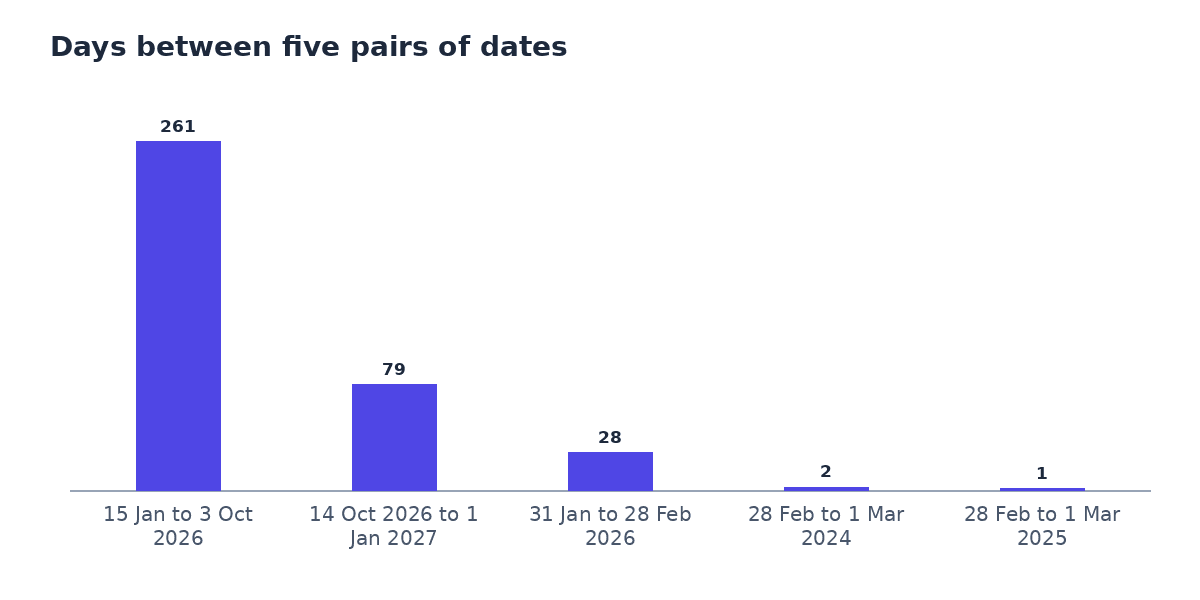
Use the total-days column for anything with a fixed length, such as a notice period or a delivery estimate. Use the years, months and days column for ages, anniversaries and tenancy lengths, where people think in calendar months.
Should you count the first and last day?#
Subtracting dates gives the number of nights between them, or the number of days that pass. From the 1st to the 3rd of a month, 2 days pass. If you want to count every calendar day touched, both the 1st and the 3rd, the answer is 3.
- Exclusive (the default): end − start. Use it for “how long until” and “how many days since”.
- Inclusive: end − start + 1. Use it when both days count, such as a hotel booking priced per day, an event running from the 1st to the 3rd, or a rule that says “including the start date”.
Worked example: a three-day conference
Assumptions: The conference starts on Monday 5 October 2026 and ends on Wednesday 7 October 2026.
- End − start: 7 − 5 = 2 days.
- Inclusive count: 2 + 1 = 3 days of events.
Check the wording of the rule, contract or booking. “Within 14 days of” and “14 days including the start” give different end dates.
If the question is about working days rather than all days, use the business days calculator, which skips weekends and any holidays you list. The guide How long is 11 business days? explains the counting rules in detail.
Leap years and month-end dates#
A leap year has 366 days because February has 29. A year is a leap year when it divides by 4, except century years, which must divide by 400. So 2024 and 2000 are leap years and 2100 will not be.
That is why 28 February to 1 March is 2 days in 2024 (29 February falls in between) and 1 day in 2025. Any gap that includes 29 February is a day longer than the same dates in a common year.
Month ends cause a second kind of surprise. The calendar breakdown adds whole months to the start date, and when the target month is shorter it uses the last day of that month. From 31 January 2026, one month later is 28 February 2026, so the gap to 28 February is exactly 1 month and 0 days, even though it is only 28 days.
From days to weeks, months and ages#
Once you have the total days, other units follow: divide by 7 for weeks, and read the calendar breakdown for months. For a person’s age on a given day, the same method applies with the date of birth as the start date. The age calculator adds the next-birthday countdown, and the guide How to calculate your exact age on any date covers leap-day birthdays.
Before you trust a date gap
- Decide whether the start day, the end day or both should count.
- Check whether the rule means calendar days or working days.
- Look for a leap day (29 February) between the two dates.
- Use total days for deadlines and the calendar breakdown for ages and anniversaries.
- Enter the dates in the same format the tool expects to avoid swapping day and month.
Common mistakes#
Mistake: Subtracting the day numbers only.
Instead: 15 to 3 gives −12, which ignores the months in between. Always subtract whole dates, or count month by month as in the worked example.
Mistake: Assuming every month has 30 days.
Instead: Months have 28 to 31 days. Eight months from 15 January is 243 days, not 240.
Mistake: Forgetting 29 February.
Instead: A gap that crosses a leap day is one day longer. Check the years involved.
Mistake: Mixing up day and month when typing dates.
Instead: 03/10/2026 is 3 October in the UK and 10 March in the US. An ISO date such as 2026-10-03 is unambiguous.
Try the tool
Date Difference Calculator
Enter two dates to see the gap in days, weeks, months and years, for dates in the past or the future.
Open the Date Difference CalculatorMore guides and calculators on this topic#
This guide is the overview for Dates and age. Each guide below goes deeper on one question, and each calculator lets you try your own numbers.
Calculators for this topic:
Other topics: How Loan Repayments Work: Payment, Interest and Term Explained, UK Take-Home Pay Explained for 2026/27: Tax, NI, Student Loans and Pensions, Percentages Explained: Of, Increase, Decrease and Reverse.
Frequently asked questions#
How many days are there between 15 January and 3 October?
261 days in 2026, which is 37 weeks and 2 days. Counted by hand: 16 days left in January, 242 days in February to September, and 3 days in October.
How do I calculate the number of days between two dates in Excel or Google Sheets?
Put the dates in two cells and subtract them, for example =B2-A2. Format the result cell as a number, not a date, or it will show a date near 1900.
Does the date difference include the start date?
Not by default. The difference counts the days that pass after the start date, so 1 March to 3 March is 2 days. Add 1 if you want to count both the first and last day.
How many weeks are 261 days?
37 weeks and 2 days, because 37 × 7 = 259 and 261 − 259 = 2.
How many days are in 8 months?
It depends on which months. From 15 January to 15 September is 243 days, but from 15 September 2026 to 15 May 2027 is 242 days. Use the calculator for the exact count between two dates.
How do I count only working days between two dates?
Use the business day counter, which leaves out weekends and any holidays you enter. A date difference counts every calendar day.
Ahad Noor
Ahad Noor builds and maintains Momentix, including its calculators, converters and the guides on this blog.
Each guide is checked against the matching Momentix tool, so the worked examples show the same figures the tool gives for the same inputs.